
I want to blog more. Let this be a start.
Stow
Today I discovered GNU Stow. It lets me share my dotfiles between my laptop, running macOS, and my desktop, running Linux. Here’s an introduction.
AppKit and UIKit as a competitive advantage
We all rushed to SwiftUI when it came out: it was the future, wasn’t it? New generations of programmers would be able to achieve more stuff with less code, and we, old-timers, didn’t want to be left behind.
SwiftUI is no longer the future—it’s the present, albeit a present that’s permanently catching up with the past. Though it’s improved a lot, creating truly polished applications still requires reaching out to AppKit and UIKit, two fantastic frameworks that we, old-timers, once tried become decent at.
It turns out we have the edge: look who’s laughing now.
My new keyboard
When I started using Linux, in the late 90s, I was looking for a familiar editing experience—something resembling the IDEs I was used to: QBasic, Turbo Pascal, etc. Just by looking at it, I thought that Emacs fit the bill. But it took me a minute of actually using it to understand how wrong I was.
So I turned to the bi-modal vi camp and learned it well. As I became more familiar with the Unix philosophy, I also learned ed. I still use both whenever I need to edit something quickly.
The Bell-Labs-esque establishment frowns at Emacs even more than at vi, and I never ever again came close to it.
But now, as a 44-year-old practicing various Lisps, I’ve developed some FOMO, and bought a second-hand copy of Learning GNU Emacs: A Guide to the World’s Most Extensible Customizable Editor (2005).
My favorite way of procrastinating is buying new stuff: “I’m not incompetent: it’s the tools I have, they’re just not up to my virtuosity.” I could have gotten used to the finger gymnastics that my Magic Keyboard was demanding from me. Instead, it’s my girlfriend who will have to get used to the noises of my new HHKB Professional Classic.

I chose the cabled version because I couldn’t tolerate the bulge of the wireless variants. And I picked the Classic because its looks bring me fond memories of the 90s, when life was easy because I didn’t need to spend my very own money to buy overpriced toys.
(Too Many) Study Tools
For the first time in my life, I’m maintaining a daily study routine, and I'm shocked that it’s working. First, because I’ve tried many times in the past and always failed miserably. Second, because I attribute part of the success to an intricate assembly of tools, some of which I’ve built myself. It’s a mystery to me how so many moving parts work well together without stealing study time.
Regardless, if you’re curious, these are the tools I’m using.
Anki
What is it? A spaced repetition memory system. You enter facts you’d like to memorize, and Anki manages a schedule that helps you recall them. How is it helping? As I read, I write prompts and review them daily. I don’t open the same books every day; I might read a bit now and continue a few days later. Without Anki, this gap would be costly, but with Anki, it’s less noticeable.
Hypothesis
What is it? An annotation tool that lets users gloss on the entire internet, including PDFs and videos. How is it helping? I try to get a PDF of anything I want to read. As I go through it, I input explanations to myself in Hypothesis. From these explanations, I derive spaced repetition prompts: I use a shorthand notation for that, so both the explanations and the prompts are colocated with their source. Plus, Hypothesis highlights the areas I annotate, and I get a motivating overview of the coverage.
Suppositio
What is it? A command-line tool written by yours truly that fetches the spaced repetition prompts that I write in Hypothesis and saves them into Anki. It tags each prompt in Hypothesis with a unique identifier, so my Anki prompts are always up-to-date. How is it helping? Without Suppositio, the prompts I embed in Hypothesis annotations wouldn’t be of much use. As an extra, Suppositio lets me bypass Anki’s abysmal prompt editor and use Anki mostly for reviews.
Zotero
What is it? A reference management software. How is it helping? In Zotero, I store all my PDFs, including the subset I’m currently studying, so I never have to ask myself where did I put that reference. I used to use DevonThink, but Zotero is so much better for books and articles!
Madaf
What is it? A web app I’ve built for integrating Zotero with Hypothesis. How is it helping? I want to be able to annotate my PDFs with Hypothesis, which is a convoluted process. Two years ago, I created Madaf to make it easier, but in earlier versions, I had to upload each PDF manually, and it was a mess. Madaf’s latest incarnation simplifies that: if it’s in Zotero, it’s in Madaf.
And there’s a bonus: though Hypothesis annotations link back to the source—a must if you want to review your annotations (and prompts!) in their context, you won’t be able to reach the source unless the PDF is hosted somewhere. Madaf is that somewhere.
Beeminder
What is it? A web app for tracking habits. It offers ready-made integrations, but you can also cook your own with their API. If you make a habit but let it go, you pay money. How is it helping? A significant number of my Beeminder goals are related to my study routine. Some track my Anki progress (see the next section), while some track my reading progress. Beeminder keeps me accountable for both.
Beemind Maintained Progress
What is it? An Anki add-on that maps a progress indicator to a Beeminder goal. How is it helping? It lets Beeminder know when I’m behind, so I can review accordingly.
That's a lot, isn't it? Setting it up was painful, but it’s paying dividends. A tool like RemNote might replace this all; however, I’m still figuring out how I learn best, and I prefer to stick with my modular approach and the flexibility it affords.
Clojure has a marketing problem
I’ve been using Datomic these days, but the official documentation isn’t helping a lot: broken links, outdated information, no sense of narrative. If I weren’t a beginner, I’d be tempted to create an unofficial site and give some love to the material. In fact, I’m already tempted, despite being a beginner!
Sadly, the problem goes beyond the content and beyond Datomic.
I can totally imagine a Clojure-curious human skimming through the official sites and feeling that the “Clojure is dead” cliché is actually true. The UIs look so dated or are just plain hideous, and the copy is so unpolished...
Clojure is amazing and has the most wonderful people working on it and with it. We in the know may not need it to also look good—but I fear many potential newcomers do, and we’re scaring them away.
Layout Guidelines for the Mac
The following sections are general guidelines that describe fundamental Mac layout principles of center equalization, text and control alignment, appropriate use of white space, and visual balance. Following these guidelines will help you create functional and aesthetically pleasing windows that are easy for Mac users to understand and use.
I love it! It should be part of the HIG.
Evaluating Clojure inside an Anki card
These days, I’m learning Clojure, and using Anki to memorize key aspects of it. Last week, I managed to embed an interactive ClojureScript snippet inside my Clojure-related Anki cards.
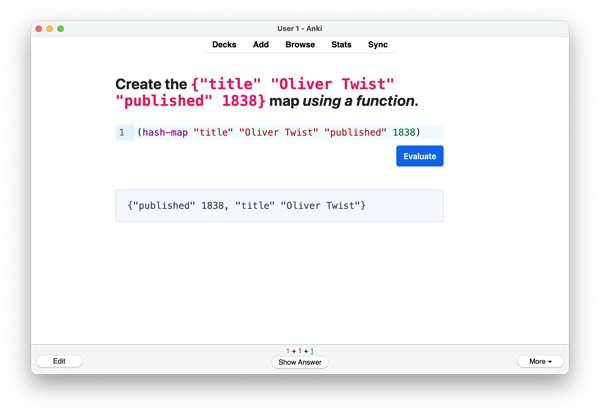
Even when I know the “official” answer, I often want to experiment and try out alternatives, and it’s great to be able to do so without having to reach out to the REPL. This also works on my phone!
Eventually, I expect another benefit: a better transfer between my spaced repetition practice and the programming practice.
All the technical merit should go to Michiel Borkent’s cljs-showcase. If someone is interested in knowing how I put this inside of Anki, please let me know in the comments, and I’ll write a follow-up.
Jira as a personal kanban
During the last few weeks, my requirements for managing my personal to-dos changed, and my system wasn’t able to serve me anymore. I tried several apps, but nothing worked, and I started toying with the idea of building my own.
I was indeed about to shave a big, fat yak. Luckily, the least exciting of all project management apps, the one that makes people wrongly believe they’re agile, came to the rescue.
Here’s how it happened.
I wanted to track how many tasks I was completing
I’ve recently begun treating my ADHD, and I’m suddenly in need of indicators. I want to measure how well my executive function is doing so that my doctor and I can tweak the treatment appropriately.
To track my habits, I’m using Beeminder. Despite its peculiar UI, Beeminder’s dashboard lets me see where I need to push harder and plan accordingly. I’ve used it on-and-off in the last few years, but something has clicked recently, and I’m loving it.
Yet, there was a crucial habit I couldn’t easily track in Beeminder: that of regularly checking off items from my to-do lists.
I also wanted a personal kanban to help me focus
I tend to start many things and to finish few of them, and something resonated with me when Oliver Burkeman discussed personal kanbans in his Four Thousand Weeks. He recommends having a simple board with three columns:
- One dedicated to the things you’re not doing. Most of them you will never get to do, and you’d better accept this fact of life.
- Another one for the things you’re currently doing. Only one card at a time—two if you also include work stuff—may be placed here.
- A last one for the things you’ve done, which, of course, you want to be as crowded as possible.
That is, you can’t start something unless you finish something else and make room in the “Doing” column.
Note that you don’t need a board to implement this system. Three lists, each representing a column, may also work fine—at least in principle.
I tried to keep using Things
Cultured Code’s Things is a beautiful piece of software. Its conceptual model is the best of all the to-do apps I’ve tried. To sum it up:
- There are to-dos, areas (“of responsibility”), and projects.
- Projects can belong to areas.
- To-dos can stand alone or belong to projects or areas.
Sadly, two limitations prevented me from using it as a personal kanban:
- I could see what I could do, and I could see what I had done, but I couldn’t see what I was doing. It sounds silly, but I wanted to see at a glance whatever I was supposed to be doing, lest I tackle a new thing before completing it. (Tags may have clumsily helped here.)
- I couldn’t easily sync my progress to Beeminder. Yes, there’s AppleScript, there’s a URL scheme, and there must be a SQLite file somewhere. Thanks, but no, thanks.
Switching to-do apps is a clear symptom of procrastination, but I decided to start looking around. I needed an app with an API, and I needed a UI that actually looks like a kanban board.
Todoist’s boards didn’t express status
Todoist, a web-based clone of Things with an API and board views, seemed to fulfill my requirements.
Though it lacked areas, I could have replicated them with tags or even projects.
But I could not work around the fact that the to-do status—done or not done—is orthogonal to the position on the board. Even if you move something to the “Done” column, the task isn’t done as far as Todoist is concerned, and you need to check it off. I wanted the board columns to have meaning.
In addition, the “Today” and “Upcoming” tabs have their own predefined, date-based board columns, which I found confusing.
Trello did help me do more things
Trello looked super-dated, and Atlassian acquired it in 2017, which didn’t feel like a good presage. I always thought that Jira, Atlassian’s flagship product, was an over-bloated piece of software, one that, alas, all the companies I’ve worked for insist on using.
I put those thoughts aside and created a new account.
After setting up a “Personal Kanban” board and linking my account with Beeminder—it has a ready-to-go integration—I used it for about a week.
To my surprise, it worked well! I had to enforce the two-card limit in the “Doing” column myself, but otherwise I began to experience two advantages of a kanban board view:
- The “Doing” column made it obvious what I was supposed to be focusing on at the moment.
- The card limit in the “Doing” column encouraged me to make tasks as small as possible, so I could keep one of the slots free.
- I could see the “Done” column growing longer all the time, which motivated me to do more.
Trello, as a personal kanban, was indeed helping me do more things.
But “doing more things” wasn’t enough
I set up Beeminder to track the number of cards in my “Done” column. Then I realized this number didn’t mean a lot to me.
First, when the “Not doing” column started accumulating cards, my system made it difficult to prioritize them. Trello’s “labels” are just colors, and you must keep the semantics in your brain. In addition, assigning them by opening a modal or by using Vim-esque shortcuts is tedious.
Second, some areas of my life were overrepresented in the “Done” column, while others were totally absent. My system wasn’t tracking balance at all. Trello would let me create multiple boards, and I could assign each to a separate Beeminder goal; there was no way to have a cross-project board.
Trello wasn’t a good fit after all.
Amazing Marvin wasn’t that amazing
Some people recommended Amazing Marvin. It has an API, and it promises to be malleable enough to fit any workflow.
To me, it felt more like a disjointed set of apps than as an app, and I didn’t have the patience to fiddle with it. The annoying Clippy-style mascot dancing around every time I checked off a to-do, because science, pissed me off.
Shaving the yak
Yak-shaving impulses had been latent all the time, but they ran amok at that point. No piece of software was going to ever fulfill my specific requirements, and I had a new mission and no other option: I had to create my own personal kanban app.
“I shouldn’t waste a lot of time, so let’s use familiar technology, such as Rails and Stimulus. Look what I did in a few hours, I’m a genius! But oh, no, I made a mistake when modeling, I should have used delegated types there. Damn, this wouldn’t have happened had I used Datomic. It’s a pity I’m so new to Clojure… But wait, why not use this project to practice Clojure and Datomic? It’s a win-win, I get organized and turn into a great Clojure programmer! And what shall I use for the front-end? Reagent and re-frame? No, no, I’m an SSR person and this goes against my principles. I’ll go with UIx… Oh, wait, Roman Liutikov is not at Pitch anymore—will Pitch still support it? And now that I think of it, didn’t Ryan Florence show off a Trello clone he did with Remix? I never used Remix, but I always wanted to, so that’s it—Remix for the front-end and a Datomic Ion for the back-end! Let’s get to it!”
You know.
And he saw Jira, that it was good
As I was already figuring out how to deploy my yet-to-be-written masterpiece, something came to mind: Jira.
Yes, Jira. The same Jira I despised the most. My whole identity is based on hating Jira. But, no, it can’t be possible. Using Jira for my personal tasks and for my personal projects?
Then I started seeing that it checked many boxes:
- It has an API and a query language that lets me fetch exactly what I want.
- It is malleable enough to fit my “personal kanban” requirements.
- You can create cross-project boards and see all your work at once.
- You can limit the amount of work in a certain column.
- Since my day job uses Jira (of course), I can also track my progress at work.
I quickly built a CLI tool (in Clojure!) that lets me map the number of issues that fulfill a certain Jira Query Language (JQL) predicate to a Beeminder goal and tried it out.
The integration is simple. It does all I want for now, and JQL will let me track whatever I want and put it wherever I want as my requirements evolve.
And it’s working great. I’m doing more things across all areas, and I feel less overwhelmed.
Jira is still ugly (though a bit less than a few years ago), slow, over-bloated.
But it has saved me from spending the rest of my life creating The Best Personal Kanban App, Try It For Free, No Credit Card Required, and let me instead do really valuable things, like writing this post.

UI Colors
I'm horrible at colors, by far the worse part of my design skills, anyone have a resource for picking color palettes, preferably ones that have light and dark mode variants?
Found this site which is really nice and along the lines of what I was looking for, says Tailwind CSS, but seems generally usable to me
ColorToolbox
ColorToolbox is implemented as a set of extensions on UIColor, NSColor and Color (SwiftUI). All utility methods and properties are available on all supported platforms.
I would imagine there are many [color utilities for AppKit, UIKit, and SwiftUI] out there, but I like this one. Made with care. Recommended.
WakaTime
Yesterday, I set up WakaTime, a sort of RescueTime for programmers. My first, sad insight: I spent about a third of my working hours waiting for Xcode to compile my SwiftUI app. I’m using a maxed-out last-generation MacBook Pro. I want to cry.
Typography books for designers
Over my 22-year career as a designer, I’ve amassed quite a nice collection of books on typography. Some have been more useful than others. In this article, I will share my thoughts on the books I’ve read, as well as gather together a list of books I’ve seen recommended elsewhere that I hope to read in the future.
I agree with Shoaf that Bringhurst’s book is wonderful, and I look forward to reading some of his recommendations soon.
An Introduction to Isolation in Swift
Recently, someone asked me a question about actor isolation. The specifics aren’t important, but I really got to thinking about it because of course they were struggling. (…) Here’s breakdown of the concepts, in the simplest terms I could come up with.
It’s an excellent article.
A tooltip that looks like a toggle’s label
Here’s the confirmation screen that ConvertKit shows you after sending a broadcast.

The toggle switch is placed right next to a “What's this?” label—and I flipped it, expecting it to reveal some additional information. I bet the same has happened to others!
If I were to fix this, I’d move the “What's this?” label closer to the “Post to my public feed” label. However, the distance between “Post to my public feed” and the switch is also problematic: I would bring them closer to make the association between the switch and its function clearer.
SwiftUI constrains me, and that’s good
I love constraints. Perfect rhymes in songwriting are my favorite example: I could talk for hours about how they improve the understandability of a song, or how they enrich semantics, etc., but by far the most important benefit is that they introduce a design constraint. They restrict my options, reducing thousands of possible line endings to maybe one or two. That’s good.
Jeff Johnson notes that GUI toolkits such as Interface Builder, conceived to boost app developers’ productivity, often fall short. Their primitives are flexible, but this flexibility allows for choices that go against the platform’s idioms.
The opposite is true for SwiftUI. I find its rigidity frustrating, but it discourages non-idiomatic UI patterns. As a result, my designs are usually better.
Now, it’s of course possible to create terrible designs using SwiftUI—just look at the average how-to Medium post. Perhaps we should invite SwiftUI to constrain us even further.
My only wish for next Wednesday’s Apple Event is Find My iPhone support for Apple TV’s remote.